

Step by step
- Open the letter in the “Documents” list. The letter must have finished being read.
- Tap Explain.
- The app shows you what happens: that the explanation comes in your app language, that the text of the letter only goes to an AI provider at your request, and that AI can make mistakes. Below that it shows how many explanations you still have this month.
- In the window, tap Explain once more. With Cancel, nothing happens.
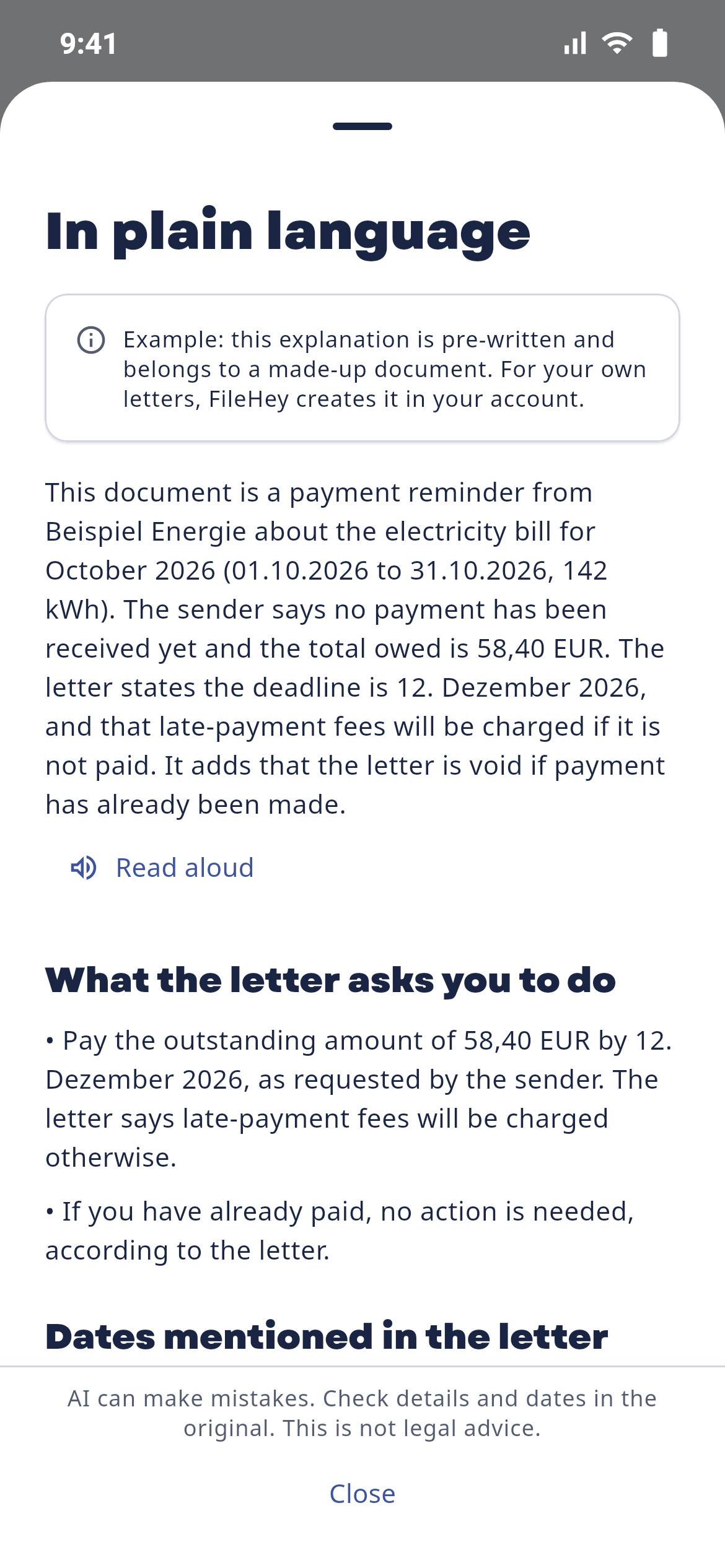
- After a few seconds, “In plain language” opens.
What you see
- In plain language: a short summary. With Read aloud you can have it read to you, if your device has a suitable voice.
- What the letter asks you to do: the steps.
- Dates mentioned in the letter: deadlines as a word-for-word quote from the letter.
At the bottom it says: “AI can make mistakes. Check details and dates in the original. This is not legal advice.” Take this seriously. The explanation helps you understand. It does not replace reading the letter.
As long as the letter is open, the “In plain language” button opens the explanation again. Later, tap Explain once more.
If your allowance is used up
Then the app says: “You’ve used all your explanations for this month. More will be available next month.” With View plans you can see what Plus and Premium include. More on this in Changing plan and cancelling.
If something goes wrong
Messages such as “This document is too long to explain.” or “This explanation is already being created.” are explained in Problems and messages.
Data protection
Your letter is not explained on its own. Only when you tap Explain and have agreed to the AI does the recognised text go to Anthropic, an AI provider in the USA. It is not blacked out in the process. If you have not agreed, the app asks again when you tap “Explain”. With your consent, the recognised text of the first page also goes to Anthropic when you file a document, for naming and categorising it. What exactly happens is explained on the page Security.
Frequently asked questions
In which language does the explanation come?
In the language you have set in the app. If you want the explanation in another language, change the language under “Account”. How to do that is explained in the instructions “Change language”.
How many explanations do I have?
Free includes 3 explanations per month, Plus 20 and Premium 100. Before explaining, the app shows “… of … explanations left this month.”
Does it count again if I have the same letter explained again?
For the same letter in the same language, the server delivers the saved explanation without it counting again. A new language counts as a new explanation. When you tap “Explain” again, the app still asks you once more.
The explanation is unclear or does not fit the letter. What can I do?
Read the letter yourself, above all amounts and deadlines in the original. If the explanation shows something that is not in the letter, trust the letter. If you are unsure, ask an advice centre. Read the recognised text in the document; perhaps a word was read wrongly.


