

Deadlines
Finding deadlines in a letter and being reminded
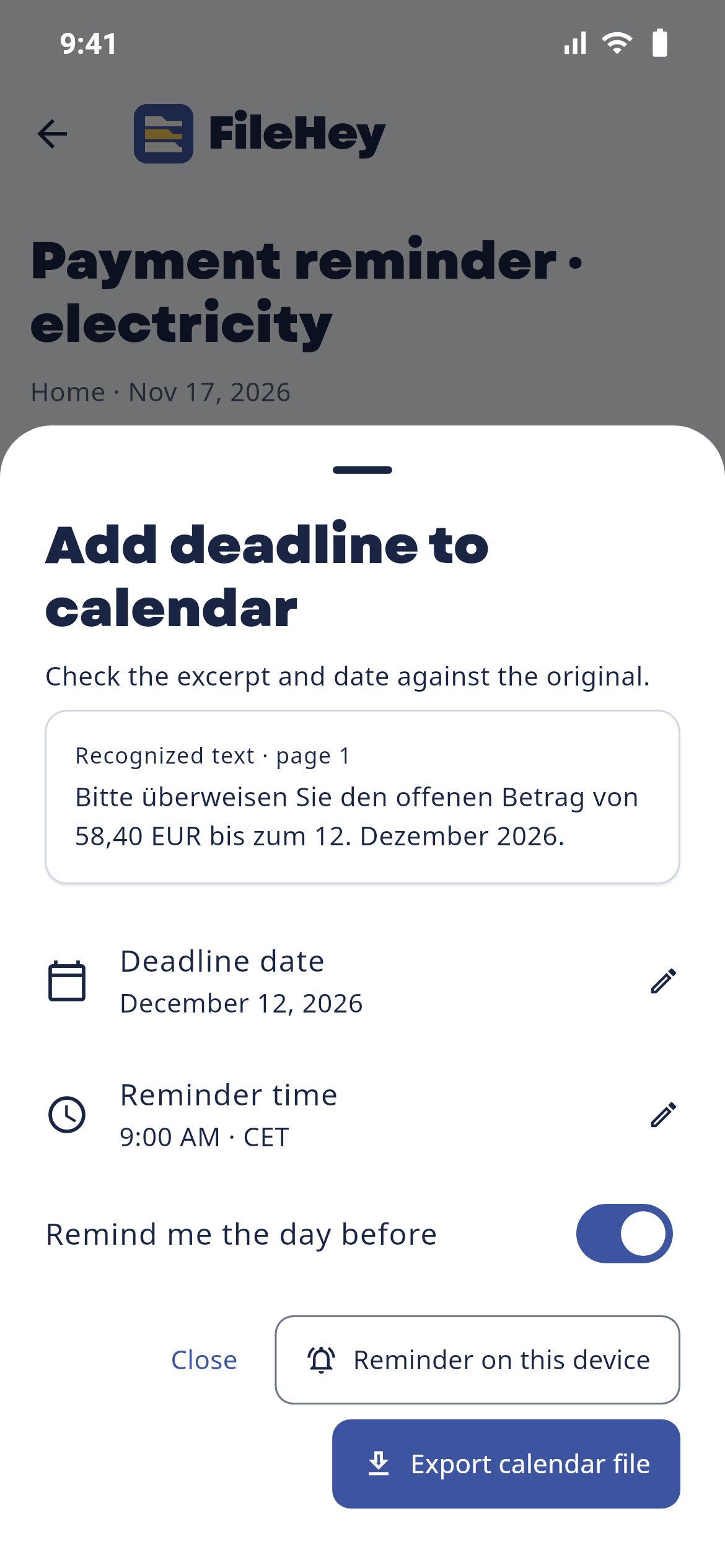
If a deadline is in the letter, FileHey suggests it and shows you the passage as a quote. With one tap you decide whether it is saved. After that, your phone reminds you.
-
The quote from the letter
The app shows the passage in the recognised text from which the date comes, with the page. This way you compare it with the original.
-
Deadlines in your account
We save your deadlines in your account. This way you see them on every device. The reminder comes from your phone.
-
Calendar file
You can export the deadline as a calendar file and open it in your calendar app. This also works in the browser.
-
You confirm the date
Nothing is entered by itself. You see the date that was found and can change it.
Explained if you ask
What it looks like
On the left is an example letter, on the right the real answer from FileHey. Choose a language and read the same explanation again.
Worum es geht
Dieses Dokument ist ein Schreiben des Amts für Bürgerdienste vom 4. März 2027. Es bittet Sie, die Anlage A einzureichen. Das Eingangsdatum des Schreibens ist nicht vermerkt, daher ist der genaue Fristbeginn unklar.
Was zu tun ist
- Reichen Sie die Anlage A innerhalb von 14 Tagen nach Erhalt dieses Schreibens beim Amt für Bürgerdienste ein.
Fristen im Brief
-
innerhalb von 14 Tagen nach Erhalt dieses Schreibens
What it is about
This document is a letter from a fictional citizen services office, dated 4 March 2027. It asks you to submit Annex A within 14 days of receiving the letter. The letter does not state the date you received it, so the exact deadline cannot be determined.
What to do
- Submit Annex A within 14 days after you receive this letter.
Deadlines in the letter
-
innerhalb von 14 Tagen nach Erhalt dieses Schreibens
Ne anlattığı
Bu belge, kurgusal bir Bürgerdienste (vatandaş hizmetleri) dairesinden 4 Mart 2027 tarihli bir yazıdır. Daire, Anlage A adlı ekin 14 gün içinde gönderilmesini istemektedir. Yazının alınma tarihi belirtilmemiştir, bu nedenle son gün kesin olarak belirlenemez.
Ne yapılmalı
- Anlage A belgesini, yazının alındığı tarihten itibaren 14 gün içinde göndermeniz istenmektedir. Alınma tarihi yazıda belirtilmediği için kesin son günü belirleyemiyoruz.
Mektuptaki son tarihler
-
innerhalb von 14 Tagen nach Erhalt dieses Schreibens
O co chodzi
Ten dokument to pismo od Amtu für Bürgerdienste z 4 marca 2027 roku. Prosi o złożenie załącznika A. Nie podano daty otrzymania pisma, więc nie da się określić dokładnego terminu.
Co trzeba zrobić
- Złożyć załącznik A w ciągu 14 dni od otrzymania pisma.
Terminy w piśmie
-
innerhalb von 14 Tagen nach Erhalt dieses Schreibens
موضوع الرسالة
هذه الوثيقة رسالة من مكتب خدمات المواطنين (دائرة وهمية)، مؤرخة في 4 مارس 2027، تطلب منك تقديم الملحق A. لا يوجد تاريخ استلام مدوّن، لذلك لا يمكن تحديد الموعد النهائي بدقة.
ما عليك فعله
- تقديم الملحق A إلى مكتب خدمات المواطنين وفق ما تطلبه الرسالة.
المواعيد النهائية في الرسالة
-
innerhalb von 14 Tagen nach Erhalt dieses Schreibens
Про що йдеться
Цей документ надіслано від імені Фіктивного амту для громадських послуг від 4 березня 2027 року. Амт просить вас подати Anlage A. Точну дату отримання листа в тексті не зазначено, тому строк не можна визначити напевно.
Що робити
- Подайте Anlage A (додаток А) протягом 14 днів після отримання цього листа, як просить амт.
Терміни в листі
-
innerhalb von 14 Tagen nach Erhalt dieses Schreibens
О чём письмо
Этот документ — письмо Амта для бюргерских услуг от 4 марта 2027 года. Амт просит вас подать приложение A. Срок — 14 дней после получения письма, но дата получения в документе не указана, поэтому точная дата окончания срока неясна.
Что делать
- Подайте приложение A в течение 14 дней после получения этого письма. Дата получения в документе не указана.
Сроки в письме
-
innerhalb von 14 Tagen nach Erhalt dieses Schreibens
Despre ce este vorba
Acest document este o scrisoare de la un birou fictiv de servicii pentru cetățeni, datată 4 martie 2027. Biroul cere trimiterea formularului Anexa A. Nu este menționată nicio sumă de bani.
Ce ai de făcut
- Trimiteți Anexa A în termen de 14 zile de la primirea acestei scrisori. Scrisoarea nu indică data primirii, deci termenul exact nu poate fi stabilit din text.
Termenele din scrisoare
-
innerhalb von 14 Tagen nach Erhalt dieses Schreibens
Real answer from FileHey to this example letter. Taken word for word. Created on 22 November 2026 with the AI model claude-haiku-5-5.
AI can make mistakes. Check details and dates in the original. This is not legal advice.
How it works
- You file the letter. If a deadline is in the letter, FileHey shows it as a suggestion: “Deadline found in the letter”. The place where it was found is shown as a quote, with the page. There are up to 3 deadlines and up to 2 appointments per letter as suggestions. Later you also see them in the Deadlines section of the letter.
- FileHey searches the recognised text for a date with a cue word, for example “zahlbar bis” (payable by), “Frist” (deadline) or “spätestens” (at the latest). A date with “Termin am” (appointment on), with a time of day, or in a summons to appear (“erscheinen Sie am …”) is shown as an appointment, not as a deadline. You compare the quote with the original.
- You tap Save. With Change you correct the date first. With Not now you put the suggestion off, and it stays with the letter. With Doesn’t fit you hide it.
- If the letter only gives a period, for example “innerhalb eines Monats nach Bekanntgabe” (within one month after notification), FileHey does not calculate a date. Then Save opens a sheet, and you choose the date yourself. If the app finds nothing, you tap Add deadline.
The deadline suggestion needs no AI and does not count against your allowance for explanations. It works on the recognised text.
The overview
In the Deadlines tab you see all saved deadlines from all your letters: Overdue, Next 7 days, Later and, folded away, Done. A number appears on the tab if deadlines are overdue or due in the next 7 days. With the tick you mark a deadline as done, with Undo you take that back. Tapping the row opens the letter.
The reminder from your phone
The reminder is a notification on your phone. The app only asks for permission for notifications the first time you save a deadline. If you say no, the deadline stays saved, but no reminder comes. The overview points this out.
FileHey reminds you up to twice: 3 days before and on the day before, each time at 9 a.m. If a time has already passed, it is skipped. If the deadline is today and it is still before 9 a.m., the reminder comes today at 9 a.m. With the switch Remind me you turn the reminder off for one deadline. If you tap the notification, the letter opens.
Your phone sets up the reminder itself. For this, FileHey fetches your deadlines from your account when you start the app, come back to it, open the Deadlines tab or change something. If you saved or completed a deadline on another device, your phone only learns about it when you open FileHey there.
A phone gets at most 60 notifications at a time, the earliest first. Android does not deliver notifications to the exact second. For tight deadlines, do not rely on the reminder alone. If you complete or delete the deadline, delete the document, sign out or delete your account, the app removes the reminders on this phone.
The calendar file
In the sheet of a deadline there is Export calendar file. The file is an all-day appointment on the day of the deadline, with a reminder. You open it in your calendar app. The name of the letter then appears in your calendar.
Limits
- The search for dates recognises German cue words. In other languages it finds nothing. Then you choose the date yourself.
- The app does not calculate relative deadlines.
- An explanation is an AI answer and can leave out deadlines or assign them wrongly. If the app shows “No explicit date identified”, check the letter yourself.
- For a Bescheid (official decision letter) with an objection deadline, or for a Mahnung (payment reminder): if you are unsure, ask an advice centre before the deadline runs out. Help with individual letters is in the guides, and for the word itself in the glossary under Frist (deadline).
Frequently asked questions
Does FileHey calculate a deadline such as “14 days after receipt”?
No. When you received the letter is not stated in the letter. The explanation shows you the statement as a quote, for example “within 14 days after receipt”, and gives the number and the unit. You choose the date yourself.
Does the reminder also work in the browser?
No. Reminders only come on your phone, in the app for Android and iPhone. In the browser and on computers you see your deadlines, but no reminder comes. There, the calendar file remains.
Where are my deadlines saved, and what does the notification say?
We save your deadlines in your account. This way you see them on every device. The reminder comes from your phone. On the lock screen it only says “FileHey” and the date, not the name of the letter.
What about an appointment that is not a deadline?
An appointment, for example at a public office, is not a deadline by which you have to do something. FileHey therefore shows it as a separate suggestion marked “Appointment”, never as a “Deadline”. It is recognised by cues such as “Termin am” (appointment on), a time of day next to the date, or a summons to appear. You can also save appointments from an explanation with “Save”.
Can the app overlook a deadline?
Yes. The search for deadlines is limited and the explanation is an AI. If the letter contains a date that the app does not recognise, you choose it yourself. Always check deadlines in the original.


